




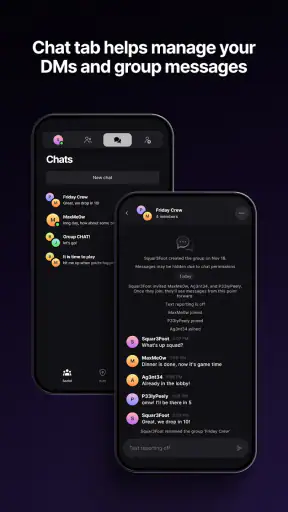
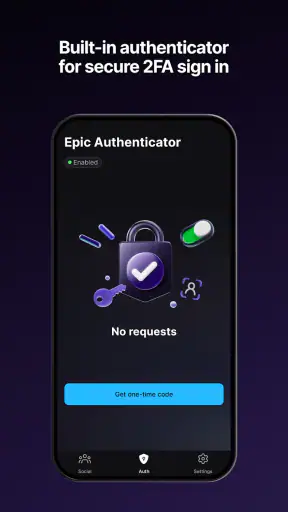


I found Epic Games most useful when I treated it as a companion for an Epic account rather than as another entertainment feed. It brings Fortnite text chats and account-protection tools into one place, which makes sense for someone who already uses Epic services and wants a more convenient way to stay connected. In my experience, its value is less about discovering something new and more about handling small account and communication tasks without opening a game first.
That distinction matters in a shared home. One person may use the app to check a Fortnite conversation, while another family member may only need access to the account-security side. The app sits in the Entertainment category, but its practical role crosses into everyday account management. It is free to use, developed by Epic Games, Inc, and aimed at a Teen audience, so I would not treat it as a general-purpose family messenger for younger children.
How Epic Games fits into a shared household
A realistic example is a household where one teenager plays Fortnite on a console or computer and a parent occasionally helps with account access. The player can use the mobile app for text-chat coordination, while the parent can be nearby when security settings or two-factor authentication need attention. That arrangement can be convenient because the phone is often easier to reach than the gaming device.
Still, I would keep the boundaries clear. This is not a shared family dashboard, and I would not assume that one installation should serve every person under one login. The sensible approach is to keep each Epic account separate, avoid casually switching between profiles, and make sure the person using the phone knows whose conversations and security settings are currently visible.
The best household use is coordinated access, not unrestricted account sharing. That sounds obvious, but it is especially important when a device is passed between family members. A chat intended for one player may contain personal conversation, and account-protection actions affect the account owner directly. Before handing over the phone, I would sign out or otherwise verify the active account context rather than relying on memory.
The app’s free price makes trying it straightforward, but free does not mean frictionless. The real question is whether your household already depends on Epic accounts. If nobody in the home uses Fortnite or another Epic service, installing this app adds another account destination without solving a clear problem. For an active Epic household, however, the combination of chat access and security tools can justify keeping it available.
What the first setup should accomplish
I recommend setting it up when the account owner is present, not during a rushed moment before a game session. That gives you time to identify the correct Epic account, review the sign-in flow, and understand where two-factor authentication is handled. The goal is not simply to get past the first screen; it is to make sure the phone is connected to the right person’s account.
On a shared device, I would also establish a simple household rule: only the account owner changes security details, and another family member can assist without taking over. That division prevents an innocent attempt to help from becoming an accidental account change. It also makes later troubleshooting easier because everyone knows who should confirm a security request.
Because the app combines communication with protection, setup deserves more care than a basic chat application. A child or teenager may understand Fortnite conversations but not the consequences of approving a security action. I would therefore explain the difference between reading a chat, responding to a friend, and authorizing an account-protection step.
One useful habit is to use the app as a checkpoint before a gaming session. If the player is waiting for friends, they can check the relevant text conversation without launching the full game. If a sign-in or protection task appears, the account owner can deal with it before the session begins. This separates preparation from gameplay and reduces the temptation to make rushed decisions in the middle of a match.
Keeping account boundaries clear
Epic Games works best when every user treats the Epic account as personal. I would not use one family member’s login as a convenient household profile, even if several people play on the same console. A shared device is manageable; a blurred account identity is much harder to manage. The distinction protects chat privacy and makes security activity easier to understand.
This is also where the app differs from ordinary family communication tools. A household messenger is usually designed around multiple known members and everyday coordination. Epic Games is centered on Epic identities and their related activity. I found it more appropriate for player-to-player coordination than for arranging school pickups, shopping, or general family plans.
If several people need access from one phone, I would create a routine for checking the active account before opening conversations or security options. That small pause is a practical safeguard. It avoids replying from the wrong identity and reduces the chance that someone changes settings on an account they do not own.
Another useful boundary is deciding who may help with two-factor authentication. Assistance can mean reading an instruction aloud or showing where a setting is located; it should not automatically mean sharing every credential. The app can support a supervised workflow, but the household still has to supply the trust and judgment. I would be particularly careful if the phone is also used for banking, school accounts, or other sensitive services.
Using chat for coordination without making it the family hub
The text-chat side is most valuable when the conversation is tied to Fortnite activity. I can imagine using it while away from the gaming setup to tell friends when I will join, clarify a plan, or catch up on a message before starting the game. That is more convenient than opening the full game solely to inspect a short exchange.
However, I would not replace a broader messaging service with it. The app’s purpose is narrower, and a household may still need a separate channel for relatives, school groups, appointments, or emergency communication. Epic Games is a focused tool for Epic-related coordination, not a universal inbox.
For parents, that narrow purpose can actually be helpful. Instead of treating every notification as a general social feed, you can frame it as part of the child’s gaming activity. A quick conversation about who the player is coordinating with, what information should remain private, and when the phone should be put away is more useful than assuming the app itself will manage those choices.
I also found that chat access away from the game can cut both ways. It may reduce interruptions because the player does not need to launch a full game just to answer a message. On the other hand, it can extend gaming-related conversation into study time, meals, or bedtime. I would use notification habits and household expectations to control that, rather than expecting the app to solve the issue automatically.
For a shared tablet or family phone, I would avoid leaving the chat screen open. Even when the conversation is harmless, another person may not want their messages displayed to everyone who picks up the device. Closing the app after use is a basic but worthwhile privacy habit, especially in a home where siblings borrow one another’s devices.
Two-factor authentication and the trust question
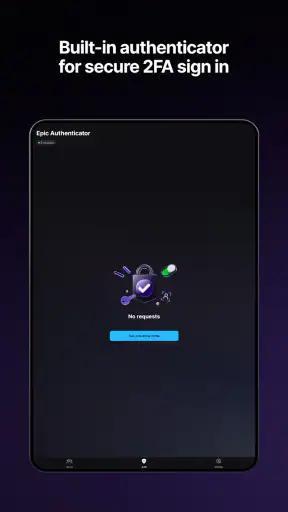
The security side is the strongest reason I would recommend installing the app for an active Epic user. Two-factor authentication adds an extra checkpoint around account access, and having account-protection tools close at hand can make security feel less like an occasional chore. I prefer that approach to waiting until a login problem appears.
In a household, the important issue is ownership. The person who controls the Epic account should understand the security process and remain the final decision-maker. A parent may supervise a younger Teen-rated user, but I would still explain what is happening instead of silently handling everything. That builds a clearer connection between the account, the device, and the person responsible for it.
There is a practical trade-off here. Extra protection can make account access slightly less convenient, particularly when a player is eager to start a session. I consider that a reasonable cost, but only if the household knows how to complete the process calmly. Keep the account details organized, avoid approving unexpected requests, and stop if the screen does not match what you expected.
I would also resist the common mistake of treating two-factor authentication as proof that every message or request is trustworthy. It protects account access; it does not replace judgment in chat. A player should still avoid sharing passwords, personal details, or codes in conversation. The app brings communication and security together, but those are different responsibilities.
This is one of the app’s less obvious strengths: it creates a natural opportunity to connect gaming habits with digital-safety habits. A parent can use a setup session to explain why account boundaries matter, why codes should stay private, and why an unfamiliar request deserves a pause. That educational value comes from the way the app is used, not from assuming the interface will teach it automatically.
Age context and everyday supervision
The Teen content rating should shape how I introduce the app at home. I would not install it for a young child and assume that the rating alone answers every supervision question. A teenager may be capable of managing a gaming account, but maturity varies, and text conversations can still require family guidance.
For a Teen user, I think the right approach is transparent supervision rather than constant hovering. Agree on when the app may be used, what kinds of information remain private, and what should happen if a conversation becomes uncomfortable. The account owner should know how to report a concern to a trusted adult, while the adult should respect that ordinary coordination is not automatically suspicious.
The app is not the right choice for a household looking for a child-focused communication environment with simple family organization. I would choose a broader family tool when the main goal is shared calendars, household messages, or location coordination. Epic Games makes more sense when the central need is keeping an Epic player connected and helping that player protect the related account.
On the other hand, it can be a good fit for a parent who wants to support gaming without needing to understand every part of a match. The parent can focus on account identity, communication habits, and security routines. That is a more realistic role than trying to monitor every in-game decision.
The app’s audience also affects where I would install it. On a personal phone used by one Teen player, the experience should be clearer and more private. On a family tablet, I would use stricter sign-in discipline and avoid treating the device as a permanent window into one person’s account. The same software can feel appropriate or awkward depending on who can pick up the hardware.
Performance expectations and practical friction
My overall impression is that the app’s usefulness depends heavily on the Epic ecosystem around it. If you regularly need Fortnite text chats and account protection, the focused design is sensible. If you expect a full entertainment catalog, a general social network, or a complete replacement for the game client, it will feel limited.
The current version is 1.5.0 and it requires Android 8.0 or later, which is relevant for older household phones. Before planning a shared-device setup, I would check the operating system and available storage, then make sure the phone can be updated and secured. A technically compatible device may still be a poor shared device if it is rarely updated or frequently passed between users.
The app has an average rating of 3.4 from around 8,500 ratings, with more than 500 written reviews, and its install count is above 5 million. I read that overall reception as mixed rather than alarming: enough people find a clear use for it, while others may encounter account, notification, or workflow friction. I would judge it by how closely your needs match its narrow purpose instead of expecting universal appeal.
That mixed impression also explains why I would keep expectations modest. A companion app can be convenient, but it does not remove every step involved in signing in, protecting an account, or coordinating with other players. When something important is at stake, taking an extra moment to confirm the account and security context is better than chasing speed.
How it compares with the usual alternatives
Compared with opening Fortnite itself, the app can be a lighter way to handle text communication and account-related tasks. That is its clearest advantage. You can separate a quick message or security check from the larger game experience, which is useful when you are away from the console or computer.
Compared with a general messaging app, it is more specialized. A normal messenger is better for a household that needs broad contact lists, family groups, file sharing, and non-gaming plans. Epic Games is preferable when the conversation is specifically connected to Epic activity and the account-protection workflow matters.
Compared with a password manager or a dedicated security application, it should not be treated as a complete digital-security system for the entire family. Its security role is tied to the Epic account. I would still use a broader, purpose-built solution for managing credentials across school, work, banking, and other services.
Compared with a family-control application, it serves a different purpose. It may help a parent participate in account and communication routines, but I would not install it expecting screen-time scheduling, household rules, or a central supervision dashboard. Those needs require a different category of tool.
The trade-off is therefore straightforward: specialization keeps the app relevant for Epic users, but it limits its value outside that ecosystem. I would recommend it to a Fortnite household that wants easier mobile access and a more visible security routine. I would skip it if the goal is one app for all family communication or all device management.
Who should install it and who should pass
I think the app is a good fit for an Epic account owner who wants Fortnite text chats available without launching the full game. It is also useful for a parent and Teen who are willing to establish clear account boundaries and treat two-factor authentication as a shared learning moment rather than an obstacle.
I would be more cautious for a household with one constantly shared phone. The app can work there, but only if users check the active account, close chats after use, and agree that security changes belong to the account owner. Without those habits, the convenience may create more confusion than it removes.
I would pass if you do not use Epic services, if you need a general family messenger, or if you are looking for extensive parental-management features. The free download is not a reason to keep an app that does not match your routine. Its focused purpose is a strength only when that purpose is genuinely relevant.
For someone deciding today, my practical recommendation is to install it on the player’s personal phone first, complete the account and security setup together, and test the chat workflow during a normal day rather than during a rushed game launch. That reveals whether the app reduces friction or simply adds another place to check.
My household verdict
After using it as an Epic companion, I see Epic Games as a focused, useful app for Fortnite communication and account protection, not as a complete household entertainment or family-management solution. Its strongest contribution is bringing those two needs close together: the player can coordinate with friends, while the household can build better habits around account ownership and two-factor authentication.
I like it most when the setup is intentional. One account per person, a clear rule about security changes, and a little care around shared screens turn the app into a practical support tool. Without those boundaries, the same convenience can expose chats, confuse identities, or encourage rushed approvals.
Its Teen rating, Android compatibility from version 8.0 onward, and free availability make it accessible to many active Epic users. The mixed average of 3.4 suggests that expectations should remain realistic, especially if you want a polished all-purpose messenger. For the right household, though, the narrow focus is enough to make it worthwhile.
My final advice is simple: choose it because your home needs mobile access to Epic conversations and account security, not because it sounds like a universal connection app. If that is your situation, I would give it a try and establish the account rules before handing the phone around. If your real need is family planning, child supervision, or general messaging, another tool will serve you better.


